Video synth
Noisedeck
Noisedeck is a video synth for real-time shader art and live visuals, built on the open source Noisemaker engine. Create, perform, and export for free in the browser, with an optional paid desktop app.
- Free in the browser, including 4K export
- Paid options: $36 or $199, one-time
- WebGL2 and WebGPU
- Desktop: macOS, Windows, Linux
Overview
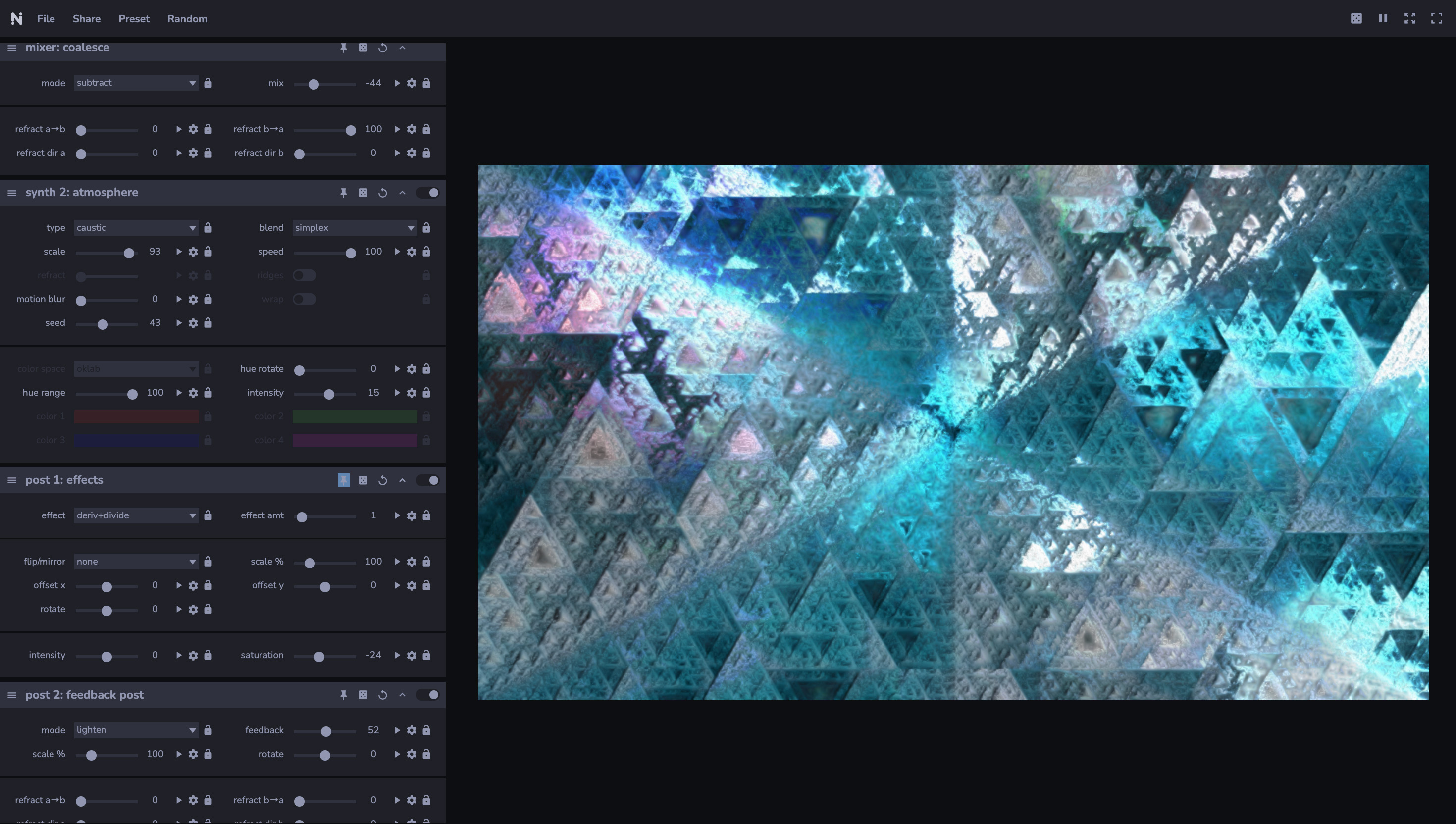
Noisedeck is a shader-based video synthesizer. You build a composition from effects: synths generate the initial pixels, mixers combine them, and filters process the result. Controls are on the left and the canvas is on the right, and every change renders immediately.
Each composition is also a program in Polymorphic, the Noisemaker composition language. You can edit it with sliders or as code, and both views stay in sync. Compositions render with the open source Noisemaker engine, so your work stays viewable and renderable without a Noisedeck purchase.
The free browser app includes video export up to 4K at 60 FPS for up to 5 minutes, images up to 4K, print output up to 16K, shader pipeline export, and live output to other apps and displays. Free image exports carry a small watermark; in videos, it appears only briefly at the end. A one-time purchase removes export watermarks and adds desktop access and priority support. There is no subscription.
Features
-
Synths, mixers, and filters
Chain generators, compositing effects, and post-processing into a free-form composition. Each effect has its own controls.
-
More than 100 effects
Noise, shapes, patterns, displacement, color blending, lens emulation, text, and stateful effects such as video feedback and reaction-diffusion. All effects target WebGL2 and WebGPU.
-
SMRTicles particles
Simulate up to millions of particles at interactive frame rates with modular, composable agent behaviors.
-
Media input
Import images and videos to transform and remix. Multi-camera input is supported.
-
Automation
Drive any parameter with noise, oscillators, audio input, or MIDI input. Right-click a parameter to create an automation.
-
Autopilot
Noisedeck changes the visuals automatically for live musical performances.
-
Code and UI round trip
Parameters in Polymorphic code generate UI controls. Move a slider and the code updates; edit the code and the sliders follow.
-
Export
Export stills as PNG, JPG, or WebP, and video or frame sequences as MP4, WebM, MOV, GIF, or ZIP, for free. Standard output supports up to 4096 by 4096 pixels, video up to 5 minutes at 60 FPS, and print output up to 16384 by 16384. A paid license removes export watermarks.
-
Shader pipeline export
Export a composition for free as a shader pipeline for multiple hosts. Compare the current routes, ports, and platform evidence.
-
Live output
Send output to a secondary display through an external viewport window, or to other apps via Syphon, Spout, NDI, and camera output with the free Noisedeck Sync app. Both are included in the free tier. Share a live editing session with others through Seance.
Specifications
| Platforms | Web browser; desktop app for macOS (Apple Silicon), Windows, Linux |
|---|---|
| Rendering | WebGL2 and WebGPU |
| Inputs | Images, video, cameras, audio devices, MIDI |
| Import formats | PNG, JPG, WebP, MP4 |
| Export formats | Free: PNG, JPG, WebP, MP4, WebM, MOV, GIF, ZIP, and shader pipeline packages |
| Export limits | Free and paid: up to 4096 by 4096, video up to 5 minutes at 60 FPS, print output up to 16384 by 16384 |
| Watermark | Free image and print exports carry a small watermark. In free videos, it appears only briefly at the end. Paid exports have no watermark. |
| Requirements | A modern graphics card or Apple Silicon. Developed primarily in Chromium-based browsers. Firefox on Linux is not supported. Mobile devices are not supported. |
| Price | Free in the browser. Noisedeck 2.x LTS ($36, one-time) adds watermark-free exports, the Noisedeck desktop app, and priority support. Noisedeck Forever ($199, one-time) also includes all Noise Factor desktop builds and all future Noisedeck versions. A 7-day free trial of LTS needs no card. |
| Education | Noisedeck 2.x LTS is free for students and educators who sign up with a confirmed academic email address. |
| Engine | Noisemaker, MIT license |
Get started
- Open noisedeck.app in a Chromium-based browser.
- Add a synth, then add mixers and filters to build the composition.
- Right-click a parameter to automate it with an oscillator, audio, or MIDI.
- Export an image, video, or shader pipeline for free, or send live output to a secondary display or another app with Sync.
Resources
- Noisedeck: the app
- Pricing and sign-up
- Documentation
- Example programs gallery
- Desktop downloads: requires a Noisedeck purchase
- Making shader art in 5 minutes: beginner walkthrough
- Universal Pipeline Export: routes and platform comparison
- Multi-platform shader export
- Noisedeck’s free tier opens up
- Why Noisedeck has no subscription
Questions
- Is Noisedeck free?
- Yes. The free browser app includes 4K video export up to 5 minutes at 60 FPS, 4K images, 16K print output, shader pipeline export, Sync output, and secondary-display output. Free images carry a small watermark, and free videos show it only briefly at the end.
- What does a purchase add?
- Noisedeck 2.x LTS ($36, one-time) removes export watermarks and adds the Noisedeck desktop app and priority support directly from the developers. Noisedeck Forever ($199, one-time) also includes all Noise Factor desktop builds and all future Noisedeck versions. There is no subscription.
- Does Noisedeck need an install?
- No. Noisedeck runs in a web browser. A desktop app for macOS (Apple Silicon), Windows, and Linux is included with a purchase.
- Can I use my compositions outside Noisedeck?
- Yes. Compositions render with Noisemaker, which is open source under the MIT license. Shader pipeline export is free, with targets including WebGL2, WebGPU, Three.js, Babylon.js, cables.gl, Godot 4, TouchDesigner, Unity, and more.